

60%, 65%, 75% and TKL keyboard layouts explained
What each size keeps, what moves onto a function layer, and what to check before buying keycaps.
Key takeaway
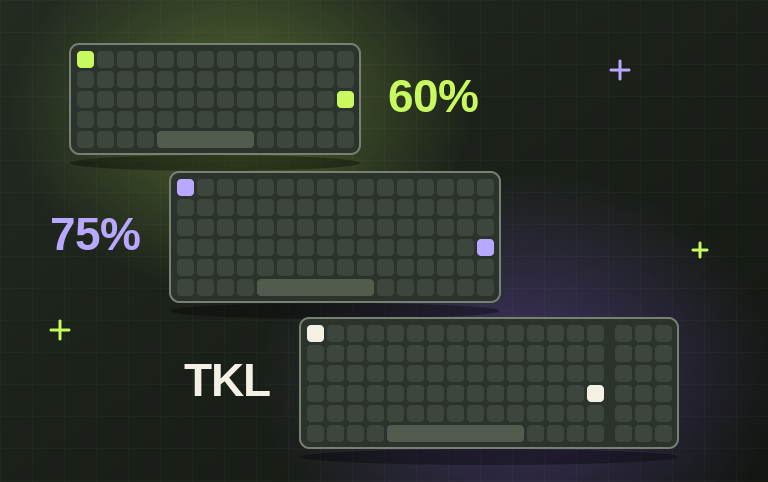
A 60% board has about 61 keys and no arrows. A 65% adds arrows. A 75% adds the function row in a tight block. TKL is a standard layout without the number pad. The smaller the board, the more often it uses short modifiers that standard keycap kits leave out.
I choose a layout by listing the keys I press every day. Then I pick the smallest board that keeps all of them on the top layer.
Keyboard layout sizes compared
| Layout | Typical keys | What you lose | Keycap check |
|---|---|---|---|
| 60% | About 61 | Arrows, function row, navigation keys | Bottom-row modifiers |
| 65% | About 66 to 68 | Function row | Short right Shift |
| 75% | About 81 to 84 | Number pad, some spacing | Right-hand column |
| TKL | Usually 87 | Number pad | Usually standard |
| 96% | Usually 98 | Gaps between key blocks | Short modifiers, number pad zero |
| Full size | 104, or 108 with extras | Nothing | Any extra keys beyond 104 |
60% and 65% keyboard layouts
A 60% board gives the most mouse room. Arrows, Delete and the function row move to a second layer, which you reach with Fn. A 65% keeps the arrows and a few navigation keys. Two examples I’ve reviewed are the HyperX Alloy Origins 60 and the Razer Reclusa X Mini.
75% and TKL keyboard layouts
A 75% squeezes the function row and arrows into one block. TKL keeps the standard spacing and drops only the number pad, which makes it one of the easier layouts to buy caps for. See the Keychron V1 Max for a 75% and the Keychron V3 for a TKL.
96% and full-size keyboard layouts
Both keep the number pad. A 96% closes the gaps to save width, and a full-size board keeps the standard spacing. If you type numbers all day, start here.
What layout means for keycaps
- Check the right Shift first. Compact boards often use a 1.75u key.
- Check the keys to the right of the spacebar.
- Check the spacebar length and its mounts.
- Run the full fit checklist before ordering.
My conclusion
For one board that does everything, I’d pick 75% or TKL. For a second board built for games, 60% or 65% frees the most desk space.
FAQs
What is the difference between 60% and 65% keyboards?
A 65% board adds dedicated arrow keys and a few navigation keys. A 60% board puts those on a function layer.
Is TKL the same as 75%?
No. TKL is a standard layout without the number pad, usually 87 keys. A 75% board packs a similar set of keys into a tighter block, usually 81 to 84 keys.
Which keyboard layout is easiest to buy keycaps for?
TKL and full size, because they use standard key sizes. Compact layouts often need extra keys from the kit.